Our app can draw, move and color shapes. One thing is missing: keeping the result. Since chapter 4, the S key takes a screenshot of the window into screenshot.ppm. But that screenshot has two flaws: you can see the toolbar, the blue outline of the selection and the color picker if it's open, and each new screenshot overwrites the previous one.
In this chapter, we replace it with a real export: only the shapes, on a white background, in a new file each time, export_1.ppm, then export_2.ppm, and so on.
Here's the same scene in the window, then in the exported file:
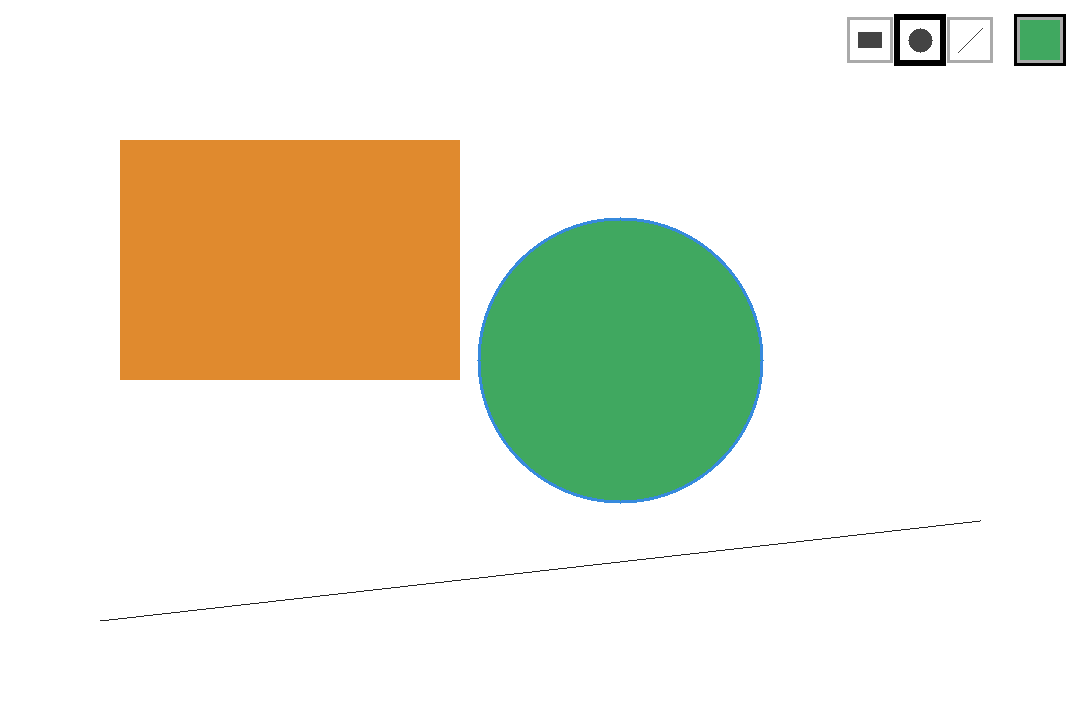
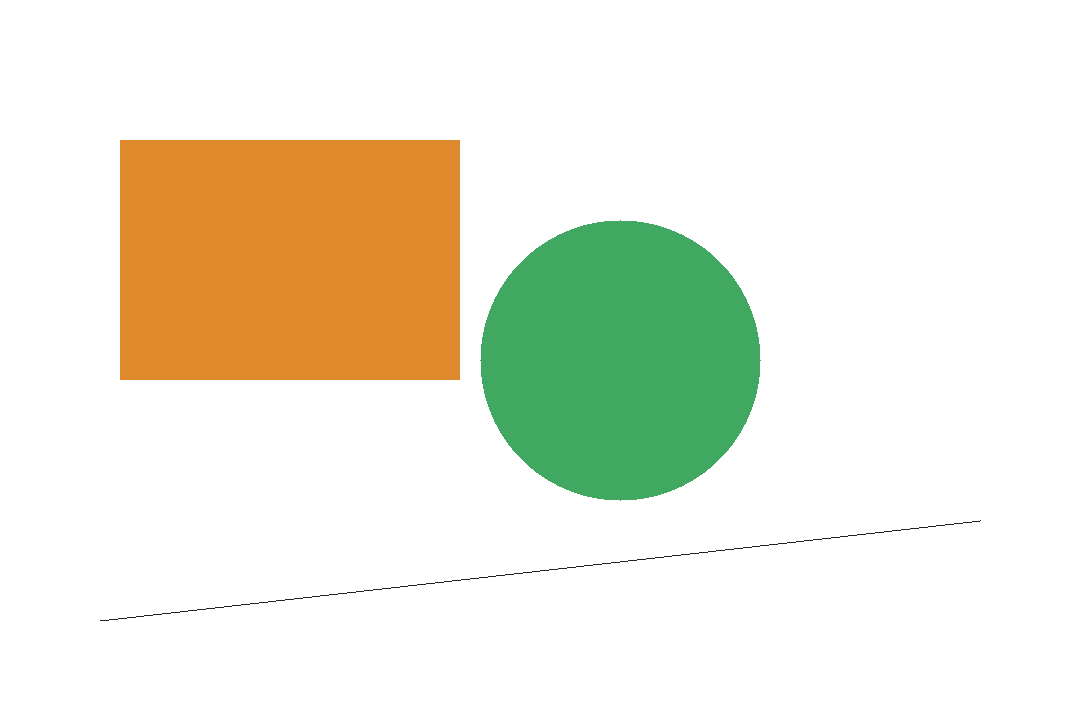
Good news: we already have almost everything. We know how to draw shapes on a canvas, turn a canvas into an image, and save an image as PPM. All that's left is to put these pieces together.
Drawing without the interface#
To get an image without the toolbar, we can't reuse the app's canvas: the interface is already drawn on it. So we create a second canvas, just for the export, and draw only the shapes on it.
Add this method at the end of the impl App block, in src/app.rs:
/// Saves the drawing (without the interface) to the first free
/// `export_N.ppm` file and returns its name.
pub fn export_ppm(&self) -> io::Result<String> {
    let mut canvas = Canvas::new(self.canvas.width, self.canvas.height);
    for shape in &self.shapes {
        shape.draw(&mut canvas);
    }

    let path = next_free_path("export", "ppm");
    Image::from_canvas(&canvas).save_ppm(&path)?;
    Ok(path)
}
The new canvas has the same size as the app's, and it's white from the moment it's created, as we decided in chapter 3. We draw the shapes on it, and only them: no preview, no selection outline, no buttons.
Then we look for a free file name with next_free_path, which we write right after, then turn the canvas into an image and save it, with the functions from chapters 2 and 3.
Saving can fail, hence the ? that sends the error up, and the io::Result<String> return type. If everything goes well, the method returns the name of the file, so we can print it.
The method takes &self and not &mut self: exporting doesn't modify the app, we only read the list of shapes.
We need three imports at the top of src/app.rs. io for the return type, Path to check whether a file exists, and Image for saving:
use std::io;
use std::path::Path;

use minifb::{Key, KeyRepeat, MouseButton, MouseMode, Window};

use crate::action::Action;
use crate::canvas::Canvas;
use crate::color::{GRAY, WHITE};
use crate::image::Image;
use crate::shapes::{Shape, Tool, shape_under};
use crate::ui::{ColorPicker, Toolbar};
use crate::vec2::Vec2;
Finding a free name#
To avoid overwriting previous exports, we try names one by one: export_1.ppm, then export_2.ppm, and so on, until we find one that doesn't exist yet.
This function doesn't depend on the app, so it goes at the end of the file, outside the impl block. It isn't pub: only this file uses it.
Solution
/// First `{prefix}_{n}.{ext}` file name that does not exist yet.
fn next_free_path(prefix: &str, ext: &str) -> String {
    let mut n = 1;
    loop {
        let candidate = format!("{prefix}_{n}.{ext}");
        if !Path::new(&candidate).exists() {
            break candidate;
        }
        n += 1;
    }
}
format! works like println!, but instead of printing the text, it returns it as a String. With prefix set to "export" and ext set to "ppm", we get export_1.ppm, export_2.ppm…
The loop is the last expression of the function, without a semicolon. So its value, the one given by break candidate, is the value returned by the function.
Hooking up the S key#
The S key took the screenshot in main.rs. We move it into handle_keys, at the end, after the if mouse_down { return; }: we don't want to export while dragging a shape.
if pressed(Key::S) {
    match self.export_ppm() {
        Ok(path) => println!("saved to {path}"),
        Err(e) => eprintln!("could not save the image: {e}"),
    }
}
It's the same match as in chapter 4: on success, we print the name of the file, and on error, we print it to the error output without stopping the app.
In src/main.rs, delete the old screenshot block, as well as the imports that are no longer used, KeyRepeat and Image. Here's the full file. This is its final version:
mod action;
mod app;
mod canvas;
mod color;
mod config;
mod image;
mod shapes;
mod ui;
mod vec2;

use minifb::{Key, Window, WindowOptions};

use app::App;
use config::{HEIGHT, WIDTH};

fn main() {
    let mut window = Window::new("Paint", WIDTH, HEIGHT, WindowOptions::default())
        .expect("could not open the window");

    let mut app = App::new(WIDTH, HEIGHT);

    while window.is_open() && !window.is_key_down(Key::Escape) {
        app.update(&window);
        app.render();
        window
            .update_with_buffer(&app.canvas().pixels, WIDTH, HEIGHT)
            .expect("could not update the window");
    }
}
The whole app now lives in App. main only opens the window and runs the loop.
cargo runDraw a few shapes, select one, open the color picker, then press S. The terminal prints:
saved to export_1.ppmOpen the file: you'll find your shapes on a white background, with no buttons, no picker, no blue outline. Press S again: this time, it's export_2.ppm. The first file hasn't been touched.
Exercises#
-
In most programs, you save with Ctrl+S (or Cmd+S on a Mac). Make S export only if Ctrl or Cmd is held. In minifb, these keys are called
Key::LeftCtrl,Key::RightCtrl,Key::LeftSuperandKey::RightSuper. -
Exporting an empty drawing isn't very useful. If no shape has been drawn, save nothing and print
nothing to savein the terminal instead. -
Bonus: instead of numbering the files, put the time in the name, for example
export_1795000000.ppm. The number is the number of seconds since January 1, 1970, which you get withstd::time::SystemTime. Since two exports in the same second would have the same name, keepnext_free_pathfor that case anyway.
Solutions
1. We check that one of the control keys is held at the same time. For that, is_key_down is the right function: we want to know whether the key is held, not whether it was just pressed.
let ctrl = window.is_key_down(Key::LeftCtrl)
    || window.is_key_down(Key::RightCtrl)
    || window.is_key_down(Key::LeftSuper)
    || window.is_key_down(Key::RightSuper);

if ctrl && pressed(Key::S) {
    // ...
}
2. At the start of the S key branch, or at the start of export_ppm. In handle_keys, it's the simplest:
if pressed(Key::S) {
    if self.shapes.is_empty() {
        println!("nothing to save");
    } else {
        match self.export_ppm() {
            Ok(path) => println!("saved to {path}"),
            Err(e) => eprintln!("could not save the image: {e}"),
        }
    }
}
3. In export_ppm, we compute the number of seconds, then pass it as the prefix to next_free_path:
let seconds = std::time::SystemTime::now()
    .duration_since(std::time::UNIX_EPOCH)
    .map(|d| d.as_secs())
    .unwrap_or(0);
let path = next_free_path(&format!("export_{seconds}"), "ppm");
duration_since can fail if the computer's clock is set before 1970. It doesn't happen in practice, but Rust makes you plan for it: we then use 0. The first file is called export_1795000000_1.ppm, the second one in the same second export_1795000000_2.ppm.
Recap#
- To export without the interface, we draw the shapes alone on a separate canvas, then reuse
Image::from_canvasandsave_ppm. format!builds aStringthe wayprintln!builds a line of text.Path::new(name).exists()tells whether a file already exists.loopis an endless loop, andbreak valueleaves it while giving it a value.- A method that modifies nothing takes
&self, and an operation that can fail returns aResult, which you handle with?ormatch.
The app's code is done. In chapter 11, we step back a little to look at what we built, before moving on to ideas for going further.