In chapter 2, we could color pixels one by one and fill a rectangle. Here, we move on to real shapes: circles and lines, on top of rectangles. By the end of the chapter, our program produces this image:
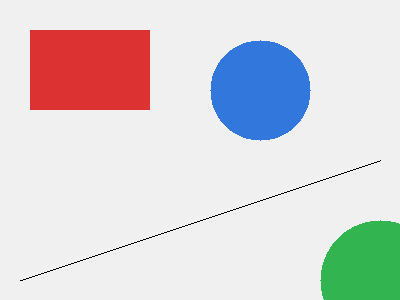
Before that, we'll change the way we store pixels. It's not a whim: the library that will open our window in chapter 4 expects pixels in a specific format, so we might as well switch now.
A color in a single number#
Until now, a pixel took three bytes in the array: red, green, blue. The library we'll use for the window prefers a single 32-bit number per pixel, a u32, with the three colors packed inside.
To see how, the easiest way is to write the number in hexadecimal. Each pair of hexadecimal digits is one byte, a value from 00 to FF (0 to 255):
0x 00 FF 80 00
   │  │  │  └── blue  : 00
   │  │  └───── green : 80
   │  └──────── red   : FF
   └─────────── unused
The bytes are spaced out here for readability, but in Rust, this number is written in one block: 0x00FF8000.
The first byte, on the far left, isn't used and stays at 00. Then come red, green and blue. So 0x00FF8000 is a lot of red, some green and no blue: an orange. Black is 0x00000000, white is 0x00FFFFFF.
Create a file src/color.rs for everything related to colors:
//! Colors are stored as `u32` in the `0x00RRGGBB` format expected by minifb.

pub const WHITE: u32 = 0x00FFFFFF;
The //! lines are documentation comments for the file itself, rather than for the item that follows.
We'll need to go from one format to the other, in both directions. Let's start by extracting the three components from a u32:
pub fn u32_to_rgb(color: u32) -> (u8, u8, u8) {
    let r = ((color >> 16) & 0xFF) as u8;
    let g = ((color >> 8) & 0xFF) as u8;
    let b = (color & 0xFF) as u8;
    (r, g, b)
}
Two bitwise operations do all the work. >> shifts the bits to the right: color >> 16 slides the number over by 16 bits, two bytes, which brings the red byte all the way to the right. Then & 0xFF keeps only the rightmost byte and sets all the others to zero. This is called a mask. For green, we only shift by one byte, and blue is already on the right, so we just apply the mask.
Finally, as u8 converts the result to a u8. Since we kept a value between 0 and 255, nothing is lost.
Solution
pub fn rgb_to_u32(r: u8, g: u8, b: u8) -> u32 {
    ((r as u32) << 16) | ((g as u32) << 8) | (b as u32)
}
Each component has to be converted to u32 before shifting it. A u8 only has 8 bits: shifting it by 16 would push all its bits out. Rust notices and refuses to compile, with the error "attempt to shift left by 16_i32, which would overflow".
The canvas#
We can now create the grid of pixels we'll draw on. Create src/canvas.rs:
use crate::color::WHITE;

/// A grid of pixels we can draw on, displayed in the window.
///
/// Pixels outside the canvas are simply ignored.
pub struct Canvas {
    pub width: usize,
    pub height: usize,
    pub pixels: Vec<u32>,
}

impl Canvas {
    pub fn new(width: usize, height: usize) -> Canvas {
        Canvas {
            width,
            height,
            pixels: vec![WHITE; width * height],
        }
    }

    pub fn clear(&mut self, color: u32) {
        self.pixels.fill(color);
    }
}
use crate::color::WHITE; fetches the constant from the color module. crate means the root of our program: it's an absolute path, which works from any file.
Compared to Image, there are two differences. The pixels are u32, one per pixel, instead of three u8. And a new canvas is white, not black, which is more natural for drawing. clear fills the whole canvas with a single color, using the fill method Rust provides.
Ignoring what sticks out#
A shape can stick out of the canvas. Take a disc of radius 50 centered at x = 20: its left edge is at x = -30. Pixels outside the canvas should simply be ignored, without crashing the program. And a usize can't represent -30.
That's why put_pixel, the function that colors one pixel of the canvas, takes i32 values, signed integers that can be negative. It's the one that sorts things out: if the point is outside the canvas, it's ignored.
impl Canvas {
    // ...

    pub fn put_pixel(&mut self, x: i32, y: i32, color: u32) {
        if x < 0 || y < 0 {
            return;
        }
        let (x, y) = (x as usize, y as usize);
        if x >= self.width || y >= self.height {
            return;
        }
        self.pixels[x + y * self.width] = color;
    }
}
We first check that x and y aren't negative. Once we're sure, we can safely convert them to usize with as, and do the same check as before for the right and bottom edges.
The line let (x, y) = (x as usize, y as usize); creates two new variables with the same names as the old ones. In Rust, this is allowed and common: the new variable hides the old one for the rest of the function. Here, it saves us from keeping an i32 x and a usize x side by side, which we could easily mix up.
The rectangle is written as in chapter 2. Its position and size stay usize, as for Image, and we convert each pixel to i32 when we pass it to put_pixel:
pub fn fill_rect(&mut self, x: usize, y: usize, w: usize, h: usize, color: u32) {
    for j in y..y + h {
        for i in x..x + w {
            self.put_pixel(i as i32, j as i32, color);
        }
    }
}
A disc#
A point is inside a disc if its distance to the center is less than or equal to the radius. If the point is offset by dx horizontally and dy vertically from the center, its distance is √(dx² + dy²), by the Pythagorean theorem. And rather than computing a square root for each pixel, we compare the squares: the point is inside the disc if dx² + dy² ≤ r².
So all we need to do is go through every pixel of the square around the disc, from -r to r in each direction, and color the ones that pass the test.
The center (cx, cy) and the radius r are usize. But in the loop, dx and dy go from -r to r: they're negative for half the pixels. So we convert the radius to i32 right at the start, with let r = r as i32;, and the center when we compute the position of each pixel.
Solution
if dx * dx + dy * dy <= r * r {Only integer multiplications, no square root and no floating-point numbers. Simple and fast.
If the disc sticks out on the left or at the top, cx as i32 + dx or cy as i32 + dy becomes negative. That's where the i32 of put_pixel come in: it ignores those pixels.
A line#
To draw a line from (x0, y0) to (x1, y1), the idea is to walk step by step from one to the other and color one pixel at each step. The whole question is: how many steps?
Too few, and the line has holes. Too many, and we color the same pixels several times, which you can't see but wastes time. The right number is the larger of the two distances, horizontal or vertical. A nearly horizontal line 100 pixels long and 20 high needs 100 steps, one per column. A nearly vertical line, one step per row.
/// Draws a line by stepping along its longest axis, one pixel per step.
pub fn draw_line(&mut self, x0: i32, y0: i32, x1: i32, y1: i32, color: u32) {
    let dx = x1 - x0;
    let dy = y1 - y0;
    let steps = dx.abs().max(dy.abs());

    if steps == 0 {
        self.put_pixel(x0, y0, color);
        return;
    }

    for k in 0..=steps {
        let x = x0 + dx * k / steps;
        let y = y0 + dy * k / steps;
        self.put_pixel(x, y, color);
    }
}
abs gives the absolute value, and max the larger of two numbers. At step k, we've gone the fraction k / steps of the way, so we're at x0 + dx * k / steps. As in chapter 2, we multiply before dividing so we don't lose precision with integer division.
This method is simple and more than enough for us. There's a more famous algorithm for drawing lines, Bresenham's, which only uses additions. The Going further page talks about it.
Saving the canvas#
We now draw on a Canvas, but it's still Image that knows how to write a PPM file. So we give Image a function that builds an image from a canvas. At the top of src/image.rs, add:
use crate::canvas::Canvas;
use crate::color::u32_to_rgb;
Then, in the impl Image block, delete fill_rect: the canvas can now do the same thing, and the compiler would point out that it's no longer used. Add this instead:
pub fn from_canvas(canvas: &Canvas) -> Image {
    let mut img = Image::new(canvas.width, canvas.height);
    for y in 0..canvas.height {
        for x in 0..canvas.width {
            let (r, g, b) = u32_to_rgb(canvas.pixels[x + y * canvas.width]);
            img.set_pixel(x, y, r, g, b);
        }
    }
    img
}
The canvas is passed by reference, &Canvas: we read it without taking it. For each pixel, we get its three components with u32_to_rgb and write them into the image. The last line, img without a semicolon, is the value returned by the function. In Rust, the last expression of a block is its value, no need to write return.
Let's draw#
Replace src/main.rs:
mod canvas;
mod color;
mod image;
#[allow(dead_code)] // Vec2 comes back in chapter 5.
mod vec2;

use canvas::Canvas;
use color::rgb_to_u32;
use image::Image;

fn main() -> std::io::Result<()> {
    let mut canvas = Canvas::new(400, 300);
    canvas.clear(rgb_to_u32(240, 240, 240));

    canvas.fill_rect(30, 30, 120, 80, rgb_to_u32(220, 50, 50));
    canvas.fill_circle(260, 90, 50, rgb_to_u32(50, 120, 220));
    canvas.draw_line(20, 280, 380, 160, rgb_to_u32(0, 0, 0));

    // Shapes can stick out of the canvas: hidden pixels are simply ignored.
    canvas.fill_circle(380, 280, 60, rgb_to_u32(50, 180, 80));

    Image::from_canvas(&canvas).save_ppm("out.ppm")?;
    println!("saved to out.ppm");
    Ok(())
}
We paint the background a very light gray, then draw a rectangle, a disc and a line. The green disc is centered near the bottom-right corner, with a radius that makes it stick out a lot: it's there to check that pixels outside the canvas are ignored, without any error.
The last line chains two calls: Image::from_canvas(&canvas) creates the image, and .save_ppm("out.ppm") saves it right away. We don't need to keep the image in a variable.
cargo runThe program prints the same line as in the previous chapter:
saved to out.ppmOpen out.ppm: you should see the image from the start of the chapter, with the green disc cut off by the corner.
The full src/canvas.rs file
use crate::color::WHITE;

/// A grid of pixels we can draw on, displayed in the window.
///
/// Pixels outside the canvas are simply ignored.
pub struct Canvas {
    pub width: usize,
    pub height: usize,
    pub pixels: Vec<u32>,
}

impl Canvas {
    pub fn new(width: usize, height: usize) -> Canvas {
        Canvas {
            width,
            height,
            pixels: vec![WHITE; width * height],
        }
    }

    pub fn clear(&mut self, color: u32) {
        self.pixels.fill(color);
    }

    pub fn put_pixel(&mut self, x: i32, y: i32, color: u32) {
        if x < 0 || y < 0 {
            return;
        }
        let (x, y) = (x as usize, y as usize);
        if x >= self.width || y >= self.height {
            return;
        }
        self.pixels[x + y * self.width] = color;
    }

    pub fn fill_rect(&mut self, x: usize, y: usize, w: usize, h: usize, color: u32) {
        for j in y..y + h {
            for i in x..x + w {
                self.put_pixel(i as i32, j as i32, color);
            }
        }
    }

    pub fn fill_circle(&mut self, cx: usize, cy: usize, r: usize, color: u32) {
        let r = r as i32;
        for dy in -r..=r {
            for dx in -r..=r {
                if dx * dx + dy * dy <= r * r {
                    self.put_pixel(cx as i32 + dx, cy as i32 + dy, color);
                }
            }
        }
    }

    /// Draws a line by stepping along its longest axis, one pixel per step.
    pub fn draw_line(&mut self, x0: i32, y0: i32, x1: i32, y1: i32, color: u32) {
        let dx = x1 - x0;
        let dy = y1 - y0;
        let steps = dx.abs().max(dy.abs());

        if steps == 0 {
            self.put_pixel(x0, y0, color);
            return;
        }

        for k in 0..=steps {
            let x = x0 + dx * k / steps;
            let y = y0 + dy * k / steps;
            self.put_pixel(x, y, color);
        }
    }
}
The full src/color.rs file
//! Colors are stored as `u32` in the `0x00RRGGBB` format expected by minifb.

pub const WHITE: u32 = 0x00FFFFFF;

pub fn rgb_to_u32(r: u8, g: u8, b: u8) -> u32 {
    ((r as u32) << 16) | ((g as u32) << 8) | (b as u32)
}

pub fn u32_to_rgb(color: u32) -> (u8, u8, u8) {
    let r = ((color >> 16) & 0xFF) as u8;
    let g = ((color >> 8) & 0xFF) as u8;
    let b = (color & 0xFF) as u8;
    (r, g, b)
}Exercises#
-
Add a
draw_circlemethod to the canvas that draws only the outline of a circle, one pixel thick. Hint: a pixel is on the outline if it's inside the disc of radiusr, but not inside the one of radiusr - 1. -
Draw the outline of a triangle from its three corners, with what we already have.
-
Bonus: our lines are one pixel thick. Write a
draw_thick_linemethod that also takes a thickness. A simple idea: instead of coloring one pixel at each step, draw a small disc.
Solutions
1. Same loop as fill_circle, with a condition on the two radii:
pub fn draw_circle(&mut self, cx: usize, cy: usize, r: usize, color: u32) {
    let r = r as i32;
    for dy in -r..=r {
        for dx in -r..=r {
            let d2 = dx * dx + dy * dy;
            if d2 <= r * r && d2 > (r - 1) * (r - 1) {
                self.put_pixel(cx as i32 + dx, cy as i32 + dy, color);
            }
        }
    }
}
2. Three lines, one per side:
let (ax, ay) = (200, 40);
let (bx, by) = (340, 260);
let (cx, cy) = (60, 260);
let black = rgb_to_u32(0, 0, 0);
canvas.draw_line(ax, ay, bx, by, black);
canvas.draw_line(bx, by, cx, cy, black);
canvas.draw_line(cx, cy, ax, ay, black);
3. We take draw_line and replace put_pixel with fill_circle, with a radius equal to half the thickness. fill_circle expects usize values, hence the as usize:
pub fn draw_thick_line(&mut self, x0: i32, y0: i32, x1: i32, y1: i32, width: usize, color: u32) {
    let dx = x1 - x0;
    let dy = y1 - y0;
    let steps = dx.abs().max(dy.abs()).max(1);
    for k in 0..=steps {
        let x = x0 + dx * k / steps;
        let y = y0 + dy * k / steps;
        self.fill_circle(x as usize, y as usize, width / 2, color);
    }
}
The .max(1) replaces the if steps == 0: if the two points are the same, we still take one step and draw a disc. That's actually how the brush of many drawing programs works, we come back to it in Going further.
Recap#
- A color fits in a
u32in the0x00RRGGBBformat. We pack it with<<and|, and unpack it with>>and the& 0xFFmask. - The
Canvasstores oneu32per pixel. That's the format the window in the next chapter expects. put_pixeltakesi32values, so shapes can stick out past the edge without crashing the program. It only converts tousizeafter checking that we're inside the canvas.- A disc is every pixel such that
dx² + dy² ≤ r². A line is one pixel per step, with as many steps as the larger of the two distances. - In Rust, the last expression of a function, without a semicolon, is the returned value.
In chapter 4, we stop writing files: we open a real window and show our canvas in it.